Mastering Digital Watercolours in Procreate
If you have ever tried to replicate the fluid, unpredictable beauty of watercolour painting on a digital canvas, you know it can be a challenge. While the iPad and Apple Pencil are powerful tools, the default brushes often feel too mechanical or uniform. They lack the subtle textures, the way pigment settles into paper grain, and the organic bleeding that makes traditional watercolour so captivating. That is precisely why finding the right set of digital tools is not just a convenience; it is a necessity for artists who want to bridge the gap between the physical and the digital.
The Anatomy of an Artisanal Brush Set
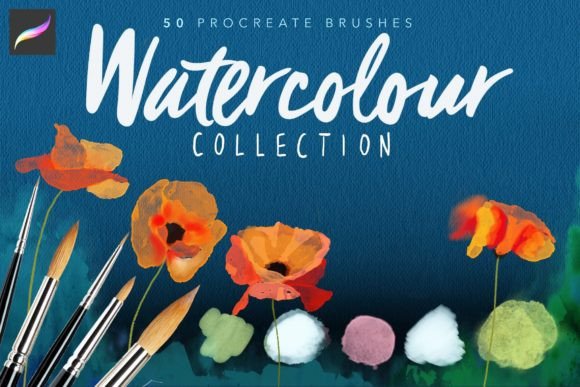
The Procreate Watercolour Brushes set is a highly comprehensive collection designed to solve these exact problems. This is not a generic collection of "wet" brushes; it is a curated suite of 50 distinct, artisanal tools that have been tweaked and tested extensively to behave like real pigment on real paper. The goal of this set is to remove the digital stiffness, allowing you to paint with the freedom and intuition you would have at a physical easel.
What makes this collection stand out in a crowded market of design assets is the variety of behaviors contained within the pack. You are not getting 50 variations of the same brush; you are getting a full spectrum of watercolour characteristics. Some brushes are designed with a watery blend that activates as you brush, mimicking the way water moves pigment across a page. Others are set to "bleed" out as you apply more pressure with your stylus, creating that organic, expanding edge that is so difficult to achieve manually.
Furthermore, the set acknowledges that watercolour is not always transparent. You will find brushes that are opaque, similar to gouache, allowing for bold, solid layers of colour. Conversely, there are sheer brushes that build up opacity slowly, perfect for glazing techniques and soft shadows. This versatility makes the Procreate Watercolour Brushes suitable for a wide range of styles, from loose, expressive sketches to highly detailed botanical illustrations.
Beyond the Brush: Paper and Texture
A watercolour painting is only as good as the paper it is painted on. Digital art often fails to capture this because artists paint on a blank, white background. To solve this, this collection includes a dedicated pack of 6 watercolour "papers." These are high-resolution files (300dpi at 3307px x 2339px) that provide the necessary tooth and grain for the brushes to react realistically.
The interaction between the brush and the paper is where the magic happens. When you paint on these textured layers, the pigment naturally settles into the valleys of the paper grain, a visual characteristic that instantly adds authenticity to your work. For a truly professional finish, the set comes with a specific production tip: setting your painted layer to Linear Burn on top of the paper layer. This blending mode allows the white areas of your paint to become transparent, letting the paper texture show through, while the colours deepen and saturate, resulting in an authentic watercolour look that is indistinguishable from the real thing.
Unlocking Unique Effects and Blending
One of the most frustrating aspects of digital painting is the need to constantly switch tools to blend or create effects. The Procreate Watercolour Brushes set includes specialized splatter and blender brushes that streamline this workflow. The splatter brushes are particularly interesting; they do not just stamp a random cluster of dots. Instead, they have surprising qualities that react to your hand movement and pressure, creating dynamic, unpredictable splashes that mimic the energy of flicking a loaded brush.
Equally important are the blender brushes. Unlike standard smudge tools, these blenders contain no pigment. They are designed specifically to manipulate the paint already on the canvas to create water effects. Whether you need a soft bleed where two colours meet, a cloud-like dispersion, or just a subtle lifting of pigment to lighten an area, these tools handle it seamlessly. This allows you to keep your flow state while painting, rather than getting bogged down in technical menu navigation.
Integrating Watercolour into Modern Design Projects
While this is clearly a tool for illustrators, the applications for Procreate Watercolour Brushes extend far into the world of brand identity, marketing, and commercial design. In an era dominated by flat, vector-based graphics and sterile sans serif fonts, watercolour textures offer a powerful way to introduce warmth, humanity, and tactility.
For entrepreneurs and small business owners, particularly in lifestyle, wellness, or artisanal food sectors, these brushes can be used to create unique logo design elements or background textures that set a brand apart. Imagine a packaging design for a tea company where the label features hand-painted botanicals created with these brushes. The visual hierarchy shifts from cold and corporate to warm and inviting, which can significantly influence brand perception and audience engagement.
In editorial design and publishing, watercolour elements are excellent for breaking up text-heavy layouts. A subtle wash behind a pull quote or a painted border around a page number adds a layer of sophistication that standard clipart cannot match. For bloggers and content creators, using these brushes to create custom social media graphics ensures a consistent aesthetic that algorithms and audiences recognize.
Practical Application and Workflow Tips
To get the most out of this collection, it is worth taking the time to experiment. Do not just grab the first brush and start painting. Each brush in the Procreate Watercolour Brushes set has a specific personality. Take a few minutes to test the opacity and flow of each tool on a scrap canvas. Notice how the "watery" brushes interact with the "opaque" ones. Understanding these nuances is key to creating realistic depth and dimension.
When it comes to font pairing, watercolour art pairs beautifully with clean, modern typography. Because watercolour can be visually complex and textured, pairing it with a premium font that has high readability—such as a classic serif font for body text or a clean display font for headlines—creates a balanced composition. Avoid using overly ornate script fonts or handwritten fonts over heavy watercolour washes, as the visual noise can make the text illegible. Instead, let the watercolour serve as the background or accent, and let your typography sit confidently on top.
For those concerned about commercial licensing, always review the terms provided with your digital downloads to ensure they fit your specific project needs, whether for personal use or client work. However, investing in a high-quality set like this is often more cost-effective than purchasing stock photos or outsourcing illustration work for every campaign.
Ultimately, the value of the Procreate Watercolour Brushes lies in their ability to translate the soul of traditional painting into a digital format. They offer a tactile, responsive experience that encourages experimentation. Whether you are a hobbyist looking to paint portraits on your couch or a designer crafting a bespoke brand identity for a client, this toolkit provides the versatility and realism needed to produce professional, emotionally resonant artwork.